




In short
- You built a working MVP without a team. That is a real achievement, and it is the first half of the job.
- In one CodeRabbit study, AI-co-authored pull requests had about 1.7x more issues and up to 2.74x more security issues than human-only ones.
- Security, payments, scaling, spam, UX and growth are where a developer earns their fee. A 10-minute self-check near the end shows you where your app stands today.

You had an idea, a $200 Claude Code or Lovable subscription, and a few evenings. Now you have a working app. People who could not write a line of code a year ago are shipping real products, and I think that is great.
Here is the part the demo videos skip. A working app and a launch-ready product are different things. The first takes a prompt. The second takes security review, payment testing, load planning, and someone who knows what breaks at 1,000 users. This article is about that gap, and how to close it without throwing away what you built.
You built a real MVP on your own, and that deserves credit
An AI-built MVP is a legitimate way to test an idea. It proves people want the thing, gives you something to show customers and partners, and costs far less than an agency build.
I am not here to talk you out of it. Prototypes are exactly what these tools are good at. You went from idea to clickable product alone, and plenty of people with ideas never get that far.
But a prototype is a starting line. Big products like Instagram, Uber or Shopify are not one clever screen. They are years of unglamorous work behind the screen, done by teams. Your app can get there, and AI can keep helping. It just needs a human who has done the hard parts before.
The first time I came across a vibecoded app, was when an acquaintance of mine showed me a complete operating system for small scale retail store owners. Which completely blew my mind that such a simple idea was presented so well, by someone who knew nothing about tech,
A demo that works is not a product that survives
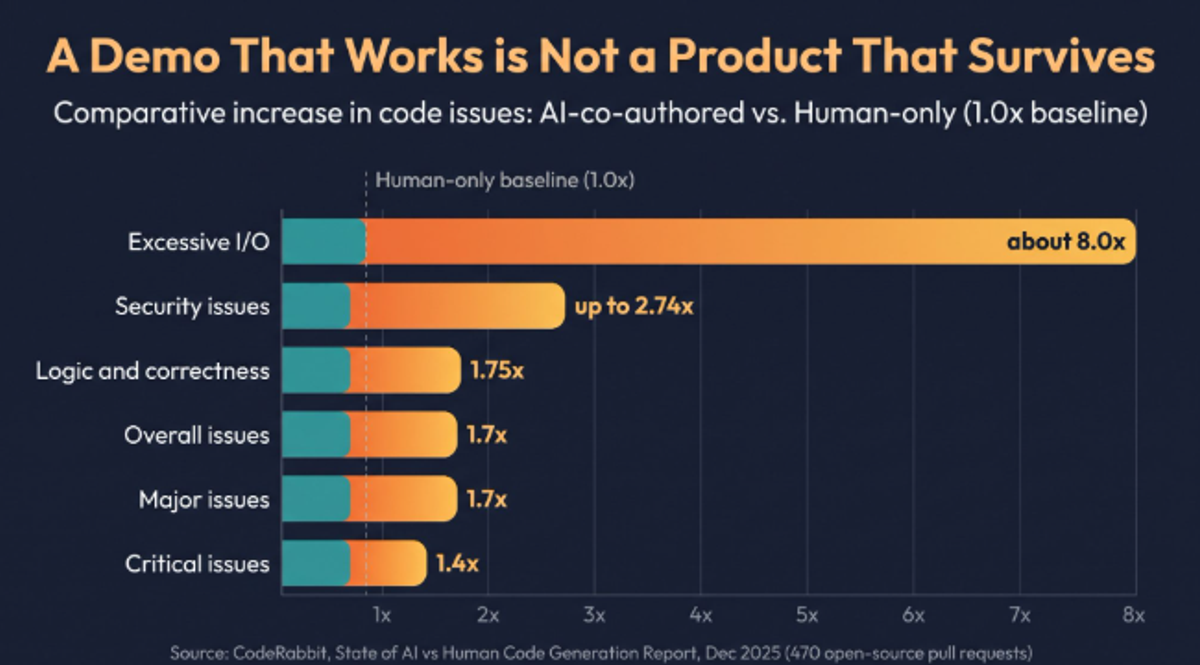
AI-generated code tends to look correct and still be wrong underneath. In December 2025, CodeRabbit analyzed 470 open-source GitHub pull requests and found AI-co-authored ones averaged 10.83 issues each, against 6.45 for human-only pull requests. That is about 1.7x more.
The same report broke it down:
| What CodeRabbit measured | AI-co-authored vs human-only |
|---|---|
| Issues per pull request | about 1.7x more (10.83 vs 6.45) |
| Security issues | up to 2.74x more |
| Critical issues | about 1.4x more |
| Major issues | about 1.7x more |
| Logic and correctness issues | 75% more |
| Excessive I/O operations | about 8x more |
A separate Cortex benchmark, reported by The Register, found pull requests per author rose 20% year over year while incidents per pull request rose 23.5%. More output, more incidents.
Read these numbers with care. CodeRabbit sells an AI code review product, the sample is open-source projects only, and the report itself says it cannot be certain every "human-only" pull request was fully human. The direction is still clear. AI writes code faster, and someone has to catch what it gets wrong.
Everyone became a developer overnight. Far fewer people know how to launch, scale and maintain a digital product. That is the gap this article is about.
AI keeps repeating the same security holes
Most breaches in AI-built apps are not clever hacks. They are exposed keys, databases with no access rules, and login checks that only run in the browser.
The evidence keeps stacking up:
- CVE-2025-48757, rated 9.3 out of 10 for severity, covered a missing database access policy in Lovable projects. One tracker counts 170 of 1,645 Lovable-built apps with no database security at all.
- Escape.tech scanned 5,600 publicly deployed vibe-coded apps and found over 2,000 vulnerabilities and more than 400 exposed secrets.
- Veracode's 2025 GenAI Code Security Report found AI-generated code introduced a vulnerability in 45% of the tasks it tested, according to a Cloud Security Alliance research note.
The pattern behind many of these is row-level security, usually called RLS. It is the rule that says user A can read user A's rows and nothing else. If RLS is off and a public key sits in your frontend code, anyone can query your whole table. AI tools sometimes switch it off "to make it work" and nobody switches it back.
Hardening goes well past one setting. A developer will check:
- Secrets stored on the server, never in the browser
- Authorization enforced on the server for every request, because hiding a button protects nothing
- Input validation, so users cannot feed your app something that breaks it
- Security headers, dependency updates and least-privilege access
- Logging, so you know when something is wrong before a customer tells you
YOUR STORY: a real security fix from your work. What was exposed, how you found it, how long the fix took. Remove client names.
Payments fail quietly, and the failures cost money
A payment flow that works in test mode can still lose you money in production. The usual causes are secret keys in the wrong place, unverified webhooks, and no plan for retries and refunds.
Take Stripe as the example. It gives you two kinds of key. The publishable key (starts with pk_) is meant for the browser. The secret key (starts with sk_) is not, ever. Founders who see two keys and an app that will not run sometimes paste both into the frontend. A secret key in browser code lets anyone act on your Stripe account.
Then there is everything after the checkout button:
- Webhooks must be verified, or anyone can fake a "payment succeeded" message
- Duplicate events need handling, or a customer gets charged or upgraded twice
- Failed cards, expired cards and disputes need a clear path
- Test mode and live mode keys must never get mixed up
- Taxes, invoices and refunds need to match your business rules
None of this is exotic. It is simply not what AI optimizes for when you ask for "a checkout page".
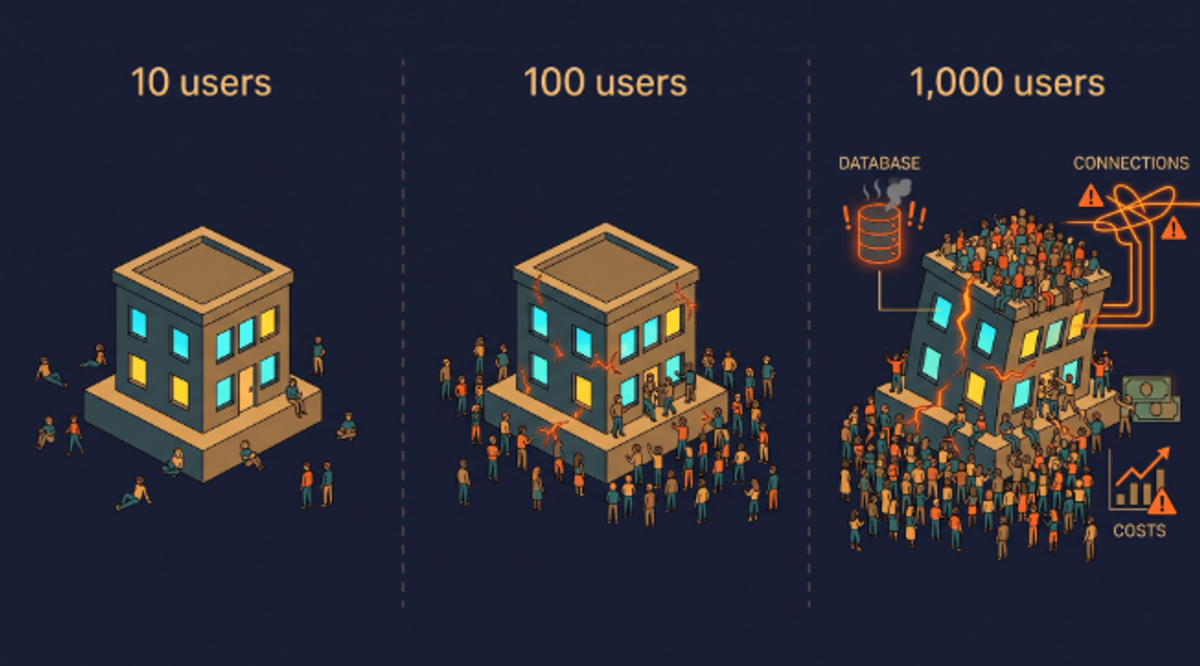
Your app is fine at 10 users and fragile at 1,000
Scaling problems hide until real traffic arrives. Then they show up all at once: slow pages, timeouts, a surprise hosting bill.
CodeRabbit found excessive I/O operations about 8x more common in AI-authored pull requests, and that is exactly the kind of thing that stays invisible with 10 users. Here is what typically breaks first:
- Database queries. One page load triggers dozens of small queries, or one big slow one with no index.
- Connection limits. Your database only allows so many simultaneous connections. Without pooling, a burst of visitors can lock everyone out.
- No caching. Every visitor triggers the same expensive work again.
- Work done inside the page request. Emails, image processing and AI calls should run in the background.
- Hosting costs. Usage-based pricing is great until the app is inefficient.
None of this means your stack is wrong. It means somebody needs to load-test it, add indexes, set limits and watch the numbers before a launch or a press mention does it for you.
YOUR STORY: a real scaling fix. What was slow, what you changed, before and after numbers if you have them.
Spam and bots will find you before customers do
Any public form, signup page or AI feature will be abused. Bots do not care that you are a small project.
Without protection, expect fake signups, junk submissions, scraped content and credential-stuffing attempts. If your app calls a paid AI API, abuse costs you directly, because every bot request is a bill. A developer will add rate limits, email verification, bot checks, spending caps and alerts. Those are small changes, and skipping them is expensive.
AI writes confident logic that is wrong
AI is good at code that looks right. CodeRabbit found logic and correctness issues 75% more common in AI-co-authored pull requests, covering business-logic errors, misconfigurations and unsafe control flow.
In practice this looks like a discount that applies twice, a booking that lets two people claim the same slot, or a signup flow that breaks when a user does things in an unexpected order. The app works on the happy path and falls over on the edges.
Hallucinations are part of this. AI tools sometimes reference functions, settings or packages that do not exist. Sometimes you get an error and notice. Sometimes the code runs but does something other than what the name implies. Tests catch this. Most AI-built apps ship with few or none.
Looking like every other AI app is a growth problem
Many AI-built interfaces share the same layout, the same spacing and the same generic feel. Users notice, even if they cannot say why.
UX is how the product works: onboarding, empty states, error messages, speed, mobile behavior. UI is how it looks and feels. Both decide whether someone trusts you with their email address or their card. A designer or a developer with design sense can give your app its own identity, fix flows that confuse people, and make it work properly on phones. That is how you stand out when anyone can generate a similar-looking app in an afternoon.
You cannot clone a tech giant with one prompt
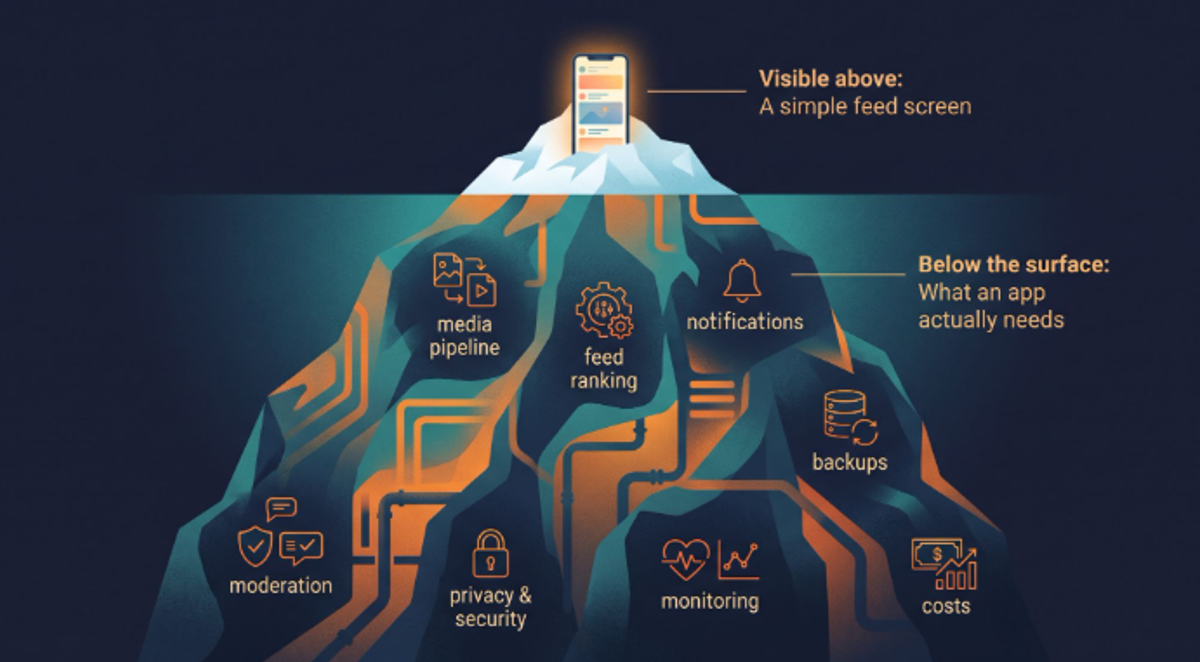
Asking an AI to build "an Instagram-like app" gives you the visible 5%. A feed, a profile, a like button.
Underneath, a product like that needs:
- Image and video upload, resizing and delivery through a CDN
- Feed ranking that does not melt the database
- Notifications across push, email and in-app
- Moderation, reporting and abuse tooling
- Privacy controls, data export and deletion
- Monitoring, backups and a plan for when things go down
- Costs that stay sane as usage grows
The visible app is the tip of an iceberg. You do not need all of that on day one. You do need to know which parts you are skipping and when they will start to matter.
Building was never the hard part. Launching and growing is.
Even a perfectly secure, scalable app does nothing if nobody finds it. Growth is its own engine and it needs its own work.
- SEO. Pages that only appear after JavaScript runs are harder for search engines and AI answer engines to read. Titles, metadata, speed and content structure all matter.
- Analytics. If you cannot see where users drop off, you are guessing.
- Onboarding and retention. Getting a signup is easy. Getting a second visit is the product.
- Marketing. A launch plan, a content plan, an email list, a reason to talk about you.
- Maintenance. Dependencies age, APIs change, and somebody has to own the updates.
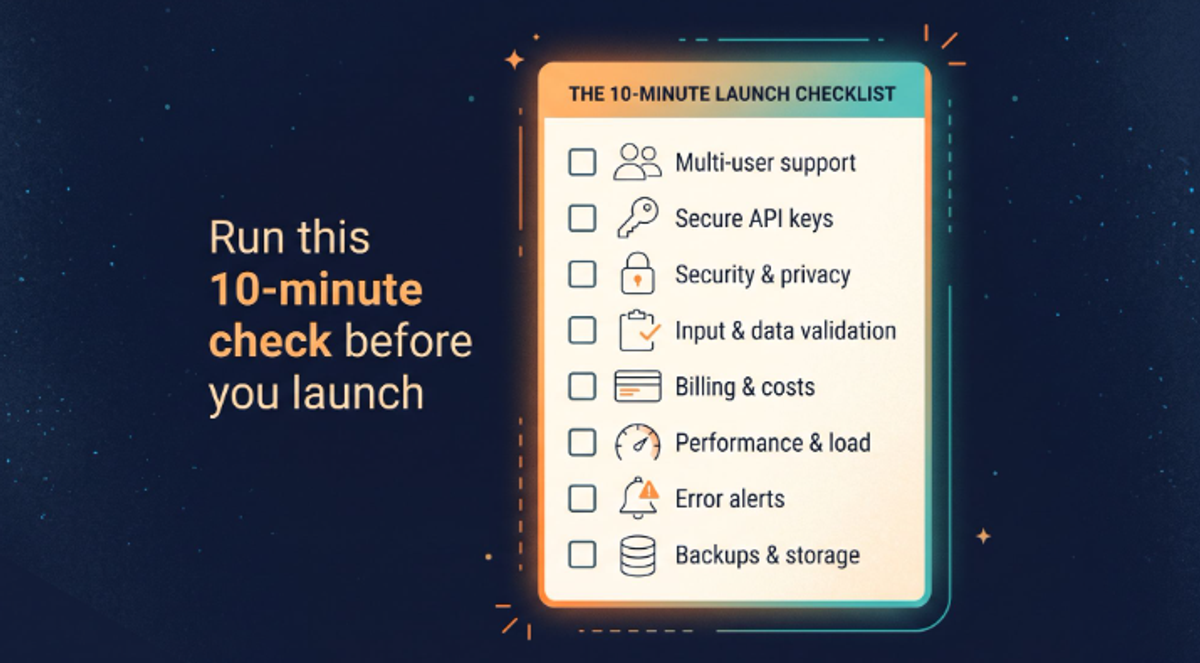
You do not need to read code for most of this. Open your app and try the following.
- Two-account test. Sign up as two different users. Try to open user B's data while logged in as user A, including by changing an ID in the web address. You should be blocked.
- Look for secrets. Open your browser's developer tools, search the page source and network requests for sk_, secret, service_role and api_key. If you find a Stripe secret key (sk_), rotate it now.
- Log out and visit private pages. Paste the web address of a private page while signed out. You should be sent to login.
- Spam yourself. Submit your signup or contact form 20 times quickly. If nothing stops you, bots will not be stopped either.
- Break a payment. In test mode, use Stripe's test cards to simulate a declined payment. Check what your app shows and what it records.
- Set spending limits. Check your AI API and hosting dashboards for caps and alerts.
- Try your phone. Go through signup and checkout on a real phone, on mobile data.
- Ask about backups. Do you have one, and has anyone tried restoring it?
If any of these fail, you have found something worth fixing before real users do. A self-check is not a penetration test. It catches the obvious, and the obvious is where most incidents start.
Bring in a developer at these five moments
You do not need a developer to start. You need one before certain milestones, and earlier is cheaper.
- Before you take real payments
- Before you store other people's personal data
- Before you spend on ads, press or a big launch
- When traffic climbs toward the hundreds of users and things feel slower
- When the same bug keeps coming back after you prompt the AI to fix it
That is what I do. I review AI-built apps for security, payments, scaling, spam protection, UX and launch readiness, then fix what matters and tell you plainly what can wait.
Keep the AI. Keep what you built. Add the part the prompts do not cover.
FAQs
Can I launch an app built with Claude Code or Lovable without a developer?
You can launch a prototype or an internal tool on your own. Before you take payments, store personal data or promote the app widely, get a developer to review security, payments and scaling.
How do I know if my AI-built app is secure?
Run the 10-minute self-check above, then get a review for anything handling money or personal data. Self-checks catch obvious holes, such as exposed keys and missing access rules, but they are not a full security audit.
What does a developer actually review in an AI-built app?
A good review covers authentication and access control, secret storage, payment and webhook handling, database performance, rate limiting and spam protection, error handling, and basic SEO and analytics. You should get a ranked list of what to fix now and what can wait.
What breaks first when an AI-built app reaches 1,000 users?
Usually the database: slow queries, connection limits and missing indexes. Next come missing rate limits, uncached work and rising hosting or AI API costs.
Is vibe coding a bad idea?
No. It is a strong way to prototype and test an idea fast. The risk starts when a prototype becomes a product with real users, money and data, without anyone reviewing the code.